






















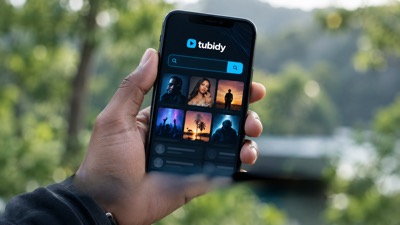

Tubidy is a free music website for finding songs and music videos and saving them as MP3 audio, MP4 audio or MP4 video. It runs in the browser on phones, tablets and computers, so there is nothing to install. Whether you are looking for a Tubidy MP3 download, a Tubidy music download for your phone or a music video, this guide covers the things people most often ask about: how to search well, which format to choose, where files end up on each device, how to explore South African music, how to stay away from copycat sites and where to get help when something does not work. For step-by-step help with a single task, the guides on this website go into more detail.
What Tubidy does, in short
Tubidy connects a search box with a download page. You type a song title, an artist or a few keywords, and the site returns a list of matching music and video results. When you open a result and tap Download, Tubidy prepares the formats that are available for that result, and you pick the one you want.
Searching and choosing a format do not require an account, and there is no subscription. The service is supported by advertising, which is why an advert or a new tab can appear during a download. The site also shows music lists, such as Top Videos, Top Searches and genre and mood playlists, for people who want to browse instead of searching for one title.
Tubidy for South African listeners
Tubidy South Africa searches often start with local music: amapiano, gospel, maskandi and the songs on the Top Videos list. Some people still look for the site as tubidy mobi, a name from the days of basic mobile phones; today Tubidy works in any current mobile browser, with no app to install and no account needed to search or choose a format.
Search like a regular listener
The most reliable search is the artist name plus the song title, for example the name of a producer followed by the track you heard on the radio. One word on its own, such as a genre name, returns a long list, which is useful for discovery but slow when you already know what you want.
If a song has several artists, start with the main artist and the title and leave out the featured names. Many uploads write the featured artists in different ways, and a shorter query matches more of them. When a search returns nothing useful, check the spelling of the artist and remove extra words such as "mp3", "download" or the year. The search tips in the troubleshooting guide cover more cases.
Find the right song and version
Include the artist and title in your search when you know both. Add words such as live, remix or acoustic if you are looking for a particular recording. Similar titles can refer to different performances, so compare the displayed artist and duration before continuing.
The title of a result usually tells you what kind of upload it is. Official Audio and Official Music Video point to the release itself. Visualiser, Lyric Video or Slowed describe other versions of the same song. A DJ mix or a live session can run for an hour or more, so a very long duration is a sign that the result is not the single. If a result is not what you expected, refine your search instead of assuming every upload is the same recording.
MP3 audio, MP4 audio or MP4 video?
The format table on a song page offers up to three options. MP3 audio is sound only and works in almost every music player, which makes it the usual choice for listening. MP4 audio is also sound only, packed in an MP4 file, and is about the same size as the MP3. MP4 video contains the picture and the sound and is the only option that shows the music video.
In our checks each format came in one quality, so there was no separate menu of bitrates or resolutions to choose from. On mobile data, file size is what counts: a four-minute MP3 at a common bitrate is roughly 4 MB, while the music video is usually much larger. Sizes differ from song to song, so save videos for Wi-Fi if your bundle is small. The format comparison explains the differences in more detail.
Using Tubidy on an Android phone
Open Tubidy in Chrome or another browser, search for the song and follow the download steps. Android browsers normally save files to the Downloads folder, and you can open them from the browser's download list or from the Files app. Most music players scan the Downloads folder and add new tracks to their library, although some only do so after a restart or a manual refresh.
The first download in a browser can trigger a permission request, especially on older Android versions. Allow it once for that browser. If files do not appear, open the browser settings and check the download location, then make sure the phone has enough free storage. The mobile download guide walks through the process step by step.
Using Tubidy on iPhone and iPad
On iPhone and iPad, Safari handles downloads through its own download manager. When a download finishes, the file goes to the Downloads folder in the Files app unless you chose a different location in Safari's settings. Tap the download icon in Safari's address bar to see recent files, or open the Files app and look under Downloads.
Audio files play directly from the Files app. To keep them organised, move them into a folder of your choice or save them to a cloud drive. Search, the song page and the format table work the same way as on Android.
Using Tubidy on a computer
On a Windows PC, a Mac or a Chromebook, Tubidy works in any current browser. Files are saved to the Downloads folder by default and open in the media player of your choice. A keyboard makes long searches quicker.
Some people prefer to build their library on a computer and copy it to a phone later. A USB cable or a cloud folder is enough for the transfer. This also makes it easier to keep a backup of the music you have saved.
Explore South African music
Amapiano, Gospel and Maskandi offer different ways to explore music beyond a single song title. Amapiano is known for its log-drum bass, piano chords and long, slow-building tracks, and many releases come as both a single and an extended mix. South African gospel ranges from large choirs to solo worship songs in isiZulu, Sesotho, English and other languages, and live recordings are common. Maskandi is Zulu guitar music from KwaZulu-Natal, built around fast picking and storytelling vocals.
The Amapiano, Gospel and Maskandi shortcuts are a starting point. From there, narrow your search to an artist, a choir or a track. Gqom, the bass-heavy club sound from Durban, and kwaito, an older township style, are also worth searching for by name. For music from across the continent, the African playlists mix South African releases with Afrobeats and other styles. The South African song list on this page is a discovery aid. It does not establish an official national ranking or guarantee that every result has the same download options.
Browse by mood and playlist
Not every visit starts with a song title. The Moods & Genres section groups playlists by feeling and activity, which helps when you want music for a moment rather than one specific track. Chill suits quiet evenings and studying, Feel good collects upbeat songs, Workout and Party lean towards energy and tempo, and Commute and Focus are made for travel and concentration.
Each playlist page lists songs that you can open one by one, and every song leads to the same download page and format table as a normal search. If a playlist introduces you to an artist you like, search for that artist next to find more of their music.
Top Videos and Top Searches
Two lists help when you want to browse. Top Videos shows Tubidy's current search results for popular South African songs, and Top Searches shows the queries people type most often. Both are useful when you want ideas for what to play next or when you remember a song only vaguely.
Neither list is an official chart. Top Videos, the South African songs and Music of the Day on this page all come from the same Tubidy search, so they update at the same time. The site does not publish how Top Searches is put together, so treat it as a guide to what people look for.
Plan for data, storage and offline listening
Think about file size before choosing a download, especially when using a limited mobile data bundle. Audio-only files and videos can differ substantially in size, and long mixes or live sessions are much larger than a single. On a slow or expensive connection, choose MP3 audio and save videos for Wi-Fi.
Once a file is saved locally, playing it offline does not require downloading it again, so you can listen without a connection. Searching, loading artwork and opening online pages still use data. Videos fill storage quickly, so clear out files you no longer play from time to time, especially on phones with little free space. Your browser settings determine where saved files can be found, as the mobile download guide explains.
When a song cannot be found
Most failed searches are fixed by changing the query. Remove extra words, check the spelling of the artist, or search for the artist on their own and pick the song from the list. Songs with local-language titles are often spelled in more than one way, so try a second spelling if the first returns nothing.
A very new release may not appear straight away, so try again later. If a result opens but the formats do not load, go back and try another result for the same song, or follow the troubleshooting guide for your symptom.
Use the right address and avoid copycat sites
Many websites use the Tubidy name or a close misspelling such as "tubidi", and some copy the design closely. Before you search, look at the address bar and make sure you are on the site you meant to open. Bookmark the address you use so you do not need to find it through a search engine each time.
If the site does not load at all, the problem may be your network rather than the site. Try another connection, such as mobile data instead of Wi-Fi, clear the browser cache or change your DNS settings. The Tubidy Not Working guide lists these fixes in order.
Stay safe while you download
A few habits make every visit smoother:
- Use the Download button under the song title. Large, colourful buttons inside adverts lead to other sites.
- If a new tab opens with another website, close it and return to the song page.
- You do not need to install anything to search or download on Tubidy. Be careful with install or update prompts that appear inside adverts.
- Keep your browser up to date, and on a computer use your usual security software.
- Copyright rules differ between countries. Keep saved music for personal listening, and read the Terms before using content in other ways.
Get help with an unavailable result
A page opening successfully does not confirm that every search or download service is working. If a file does not start, check your connection and available storage, then follow the download fixes for your symptom. Use Contact to report incorrect song details or a persistent problem, and consult the Terms and copyright information when deciding how content may be used.
Where to find more information
The links at the bottom of every page lead to the site's information pages. About Us describes the site. The FAQ answers more questions about searching, formats and devices. Privacy explains how the site and its advertising partners use cookies and similar technologies. The Disclaimer and Terms set out the conditions for using the site, and the DMCA page explains how rights holders can report content. Contact is the place for questions and problem reports, and the Blog collects longer guides.